Summary of Generative AI Tools by Categories
1. Category Overview Table
| Category | Purpose | Representative Tools | What These Tools Are Best For |
|---|---|---|---|
| A. Chat-Based General-Purpose GenAI Tools | Natural chat interface for text, reasoning, multimodal tasks | ChatGPT, Claude, Gemini, Microsoft Copilot, Perplexity | Teaching prompt engineering, general Q&A, reasoning, multimodal tasks, analysis |
| B. Multimodal Creation Tools (Text → Image/Video/Audio) | Create images, videos, voice, avatars, etc. | Midjourney, DALL·E, Runway, Pika Labs, HeyGen, Synthesia, ElevenLabs | Visual content creation, marketing assets, classroom demos of generative models |
| C. Application-Specific GenAI Tools | Tools built for one domain or sector | GitHub Copilot (coding), Notion AI (writing), Canva AI (design), Descript (audio/video editing), Fireflies (meeting notes) | Productivity automation, business use-cases, workflow enhancement |
| D. Method/Technique-Specific GenAI Tools | Tools based on a single technique (diffusion, LLMs, audio models) | Stable Diffusion, Whisper, Llama, Mistral, OpenVoice | Teaching model architectures, demonstrating how specific model types work |
| E. Agent-Based / Workflow Automation GenAI Tools | Create AI agents that perform tasks autonomously | Devin AI, Replit Agents, Zapier AI, AutoGPT | Automation, coding agents, business workflows |
| F. Search-Augmented AI Tools | Combine AI + search for factual answers | Perplexity, You.com AI, Arc Search, Google Gemini | Research, document retrieval, grounded answers |
| G. Enterprise GenAI Platforms | Enterprise governance, security, and API-based development | Azure OpenAI, AWS Bedrock, Google Vertex AI, IBM watsonx | Enterprise adoption, model hosting, integrations, safe deployment |
| H. No-Code/Low-Code GenAI Builders | Build apps without coding | Bubble AI, Glide AI, Zapier AI Actions, Notion Q&A | Building prototypes, lightweight tools for business students |
2. Detailed Descriptions
A. Chat-Based General-Purpose Tools
Description:
LLM chatbots with multimodal understanding.
Use in class: Teaching prompting fundamentals, reasoning demos.
Examples:
- ChatGPT
- Claude
- Gemini
- Microsoft Copilot
- Perplexity AI
B. Multimodal Creation Tools (Generative Media)
Description:
Tools that convert text → image/video/audio.
Use in class: Show how diffusion models & generative media pipelines work.
Examples:
- Images: Midjourney, DALL·E, Stable Diffusion
- Video: Runway Gen-2, Pika Labs
- Audio/Voice: ElevenLabs, OpenAI Voice Engine
- Avatar/Face: HeyGen, Synthesia
C. Application-Specific GenAI Tools
Description:
Built for one purpose (coding, design, audio editing).
Use in class: Show domain-specific adoption of AI.
Examples:
- Coding → GitHub Copilot, Replit AI
- Design → Canva Magic Studio
- Meeting automation → Fireflies, Otter AI
- Writing → Notion AI, GrammarlyGo
- Video/audio editing → Descript
D. Method/Technique-Specific Tools
Description:
GenAI tools demonstrating specific model families or techniques.
Use in class: Model architecture explanation (LLMs, diffusion, audio models).
Examples:
- LLM families: Llama, Mistral
- Diffusion image models: Stable Diffusion, Kandinsky
- Audio/ASR models: Whisper, RVC Voice Cloning models
E. AI Agent / Workflow Automation Tools
Description:
Multi-step agents that plan and execute tasks.
Use in class: Teach advanced prompting (tool use, planning).
Examples:
- Devin (coding agent)
- AutoGPT
- Zapier AI Agents
- Replit AI Agents
F. Search-Augmented AI Tools
Description:
AI + web search = factual, sourced answers.
Use in class: Research assignments, fact-checking.
Examples:
- Perplexity
- You.com AI
- Arc Search
- Gemini (search-integrated mode)
G. Enterprise GenAI Platforms
Description:
Platforms for deploying GenAI with governance & APIs.
Use in class: For management students—enterprise adoption & strategy.
Examples:
- AWS Bedrock
- Azure OpenAI Service
- Google Vertex AI
- IBM watsonx
H. No-Code/Low-Code GenAI Builders
Description:
Tools for building GenAI apps without programming.
Use in class: Build a simple chatbot or assistant in class.
Examples:
- Bubble AI
- Glide AI
- Notion Q&A
- Zapier AI Actions
3. High-Level Summary Table (One-Page Version)
| Category | Examples | Primary Use |
|---|---|---|
| Chat-based general purpose | ChatGPT, Claude, Gemini, Copilot | Reasoning, Q&A, multimodal tasks |
| Multimodal creation | Midjourney, DALL·E, Runway, Pika, ElevenLabs | Image/video/audio generation |
| Application-specific | GitHub Copilot, Notion AI, Canva AI, Descript | Domain-specific productivity |
| Technique-specific | Stable Diffusion, Llama, Whisper | Model-architecture-based learning |
| Agent-based | Devin, Zapier AI, AutoGPT | Automated task execution |
| Search-augmented | Perplexity, You.com, Gemini | Research & factual answers |
| Enterprise platforms | Azure OpenAI, AWS Bedrock, Vertex AI | Organizational deployment |
| No-code GenAI builders | Bubble AI, Glide AI, Zapier AI | Quick GenAI app creation |
Summary Table: Possible Functionalities for a GenAI Application
| Functionality | Frameworks / Libraries to Build It | Techniques / Models Required | Additional Notes / Considerations |
|---|---|---|---|
| 1. Text Generation / Chat Interface | OpenAI API, Anthropic API, Google Gemini API, HuggingFace Transformers | LLMs (GPT, Claude, Llama, Mistral) | Add conversation memory, caching, safety filters, prompt templates |
| 2. Text Summarization | OpenAI, HuggingFace Summarization Pipelines | LLMs, abstractive + extractive summarization | Use chunking for long documents, add citation mode if needed |
| 3. Document Ingestion & Q&A | LangChain, LlamaIndex, Pinecone, ChromaDB | Retrieval-Augmented Generation (RAG), embeddings | Requires splitting, vector DB, retrieval + generation pipeline |
| 4. Image Generation | DALL·E API, Stability API (Stable Diffusion), Midjourney (indirect), Diffusers library | Diffusion models (StableDiffusion, SDXL) | Requires GPU if self-hosted, add prompt controls (CFG, step size) |
| 5. Image Understanding / Vision Q&A | OpenAI Vision API, Gemini Vision, CLIP, BLIP-2 | Vision-Language Models (VLMs) | Useful for OCR, charts, diagrams; ensure resolution constraints |
| 6. Video Generation | Runway Gen-2 API, Pika Labs API, Stability Video models | Diffusion-based video models | Expensive compute; use queueing & async processing |
| 7. Video Understanding | OpenAI Video API, Gemini Video, Whisper + frame extraction | Multimodal video understanding models | Requires splitting video into scenes, audio transcript |
| 8. Audio Transcription | Whisper API, AssemblyAI, Deepgram | Speech-to-Text models | Good for meetings, lectures, podcasts |
| 9. Audio Generation / Voice Cloning | ElevenLabs API, OpenAI Voice API, RVC | Text-to-Speech, Voice Replication models | Need ethical consent; storage of voiceprints requires caution |
| 10. Code Generation & Debugging | GitHub Copilot API, OpenAI Code Models, Code Llama | Code-specific LLMs | Add sandbox for execution; prevent harmful code |
| 11. AI Agents / Task Automation | LangChain Agents, OpenAI Assistants, Microsoft Autogen, CrewAI | Tool-using LLMs, planning models | Needs tool calling, memory management, safety rules |
| 12. Workflow Automation | Zapier AI Actions, n8n, Autogen, LangGraph | Multi-step chain-of-thought + orchestration graphs | Use when tasks require sequence, branching logic |
| 13. Search-Augmented AI | Perplexity API (beta), SerpAPI + LLM, Bing Search API | RAG + Web Search | Great for factual accuracy & real-time data |
| 14. Multi-Agent Systems | Autogen, LangGraph, CrewAI | Multi-agent collaboration models | Requires careful design to avoid looping/interference |
| 15. Knowledge Base / Chat with Data | LlamaIndex, LangChain, Weaviate, Pinecone | Embeddings + RAG | Ideal for enterprise knowledge retrieval |
| 16. Personalization & User Profiling | Custom metadata stores, vector profiles | User-adaptive LLM responses | Requires consent; avoid sensitive attributes |
| 17. Fine-Tuning / Custom Model Training | HuggingFace Trainer, LoRA, QLoRA | LLM fine-tuning, adapter methods | Needs GPU; ensure dataset quality |
| 18. AI-Powered Search Engine | Elasticsearch, Vespa, Weaviate + LLM | Semantic search, embeddings | Good for internal document search |
| 19. Image Editing / Inpainting | Stable Diffusion Inpainting, DALL·E editing | Diffusion + masked generation | Needs image masks; GPU recommended |
| 20. Avatar / Human Animation | HeyGen API, Synthesia API | Video diffusion + motion transfer | Good for marketing & education videos |
| 21. Data Analysis & Visualization (LLM-assisted) | OpenAI + Python Interpreter, PandasAI | Code-executing LLMs, Python sandbox | Useful for dashboard generation, csv insights |
| 22. Chat with PDF / Excel / PPT | OpenAI + File API, Unstructured.io, LlamaIndex | File parsing, multimodal LLM | Requires extraction pipelines (PDF OCR, table readers) |
| 23. Sentiment & Emotion Analysis | HuggingFace sentiment models | Text classification models | Lightweight; no need for full LLM |
| 24. Recommendation Engine | LightFM, Matrix Factorization, vector similarity | Embeddings, collaborative filtering | Combine traditional ML with embeddings |
| 25. Multi-Modal Prompting Engine | Custom orchestrator using LangChain or Python | Routing models for text, vision, audio | Allows switching models based on input modality |
| 26. Chatbot with Memory | Redis, PostgreSQL, Pinecone + LangChain | Long-term embeddings + short-term context | Essential for realistic conversational UX |
| 27. API-Based Automation Assistant | LangChain tool calling, Zapier AI | Function calling LLMs | Useful for ERP/CRM integrations |
| 28. Autonomous Research Agent | LangGraph, Multi-Tool LLMs, SERP APIs | Planning + tool use + retrieval | Similar to Perplexity-style behaviour |
| 29. Email/Report/Document Generation | GPT-based templates, Jinja2 templating | LLM text generation + structured output | Great for enterprise workflows |
| 30. Safety, Moderation & Red-Teaming | OpenAI Moderation API, Guardrails AI, Presidio | Safety classifier models | Required for enterprise deployments |
🔵 Temperature
Temperature controls creativity vs predictability in text generation.
- Low temperature (0.0–0.3):
Deterministic, factual, stable, minimal creativity.
Example: “Write a definition” → will give the most standard answer. - Medium temperature (0.4–0.7):
Balanced creativity and clarity.
Example: Good for strategic thinking or alternatives. - High temperature (0.8–1.3):
Highly creative, surprising, diverse outputs.
Example: Brainstorming, storytelling, idea generation.
Typically, you cannot set temperature numerically in the chat interface, but you can request the style:
- “Use low temperature—be precise and factual.”
- “Use high temperature—give very creative, unconventional ideas.”
🟡 Top-k
Top-k controls how many of the highest-probability words the model considers when generating each token.
- Low top-k (e.g., 10):
Only picks from the top 10 likely tokens → very focused and safe. - High top-k (e.g., 100+):
Picks from a large pool → more variety, more surprise.
Typically, you can’t input k directly, but you can tell ChatGPT:
- “Use a low top-k style—give the safest, most probable wording.”
- “Use a high top-k style—allow more possibilities and variety.”
🔴 Top-p (Nucleus Sampling)
Top-p chooses from all tokens whose probabilities add up to p.
- Low top-p (0.3–0.5):
Only the most probable phrases → steady, predictable. - High top-p (0.9–1.0):
Allows more “tail” probabilities → more diversity and creativity.
Difference from Top-k
- Top-k restricts by count (top 50 words).
- Top-p restricts by cumulative probability (top 90% probability).
Typically it is not possible to set directly in the chat interface. Hence, you can control it as below:
- “Use a low top-p style—keep responses tightly focused.”
- “Use a high top-p style—be more exploratory and creative.”
Summary
| Setting | Output Style | Good For |
|---|---|---|
| Low Temperature / Low k / Low p | Predictable, concise, factual | Summaries, analysis, policy, deterministic answers |
| Medium Settings | Balanced, practical | Business strategy, recommendations |
| High Temperature / High k / High p | Creative, surprising | Innovation, marketing ideas, brainstorming |

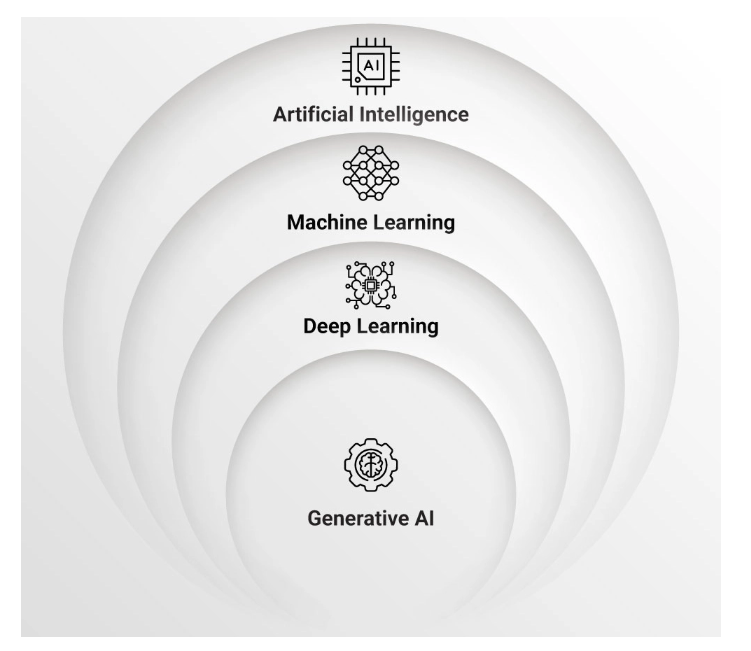
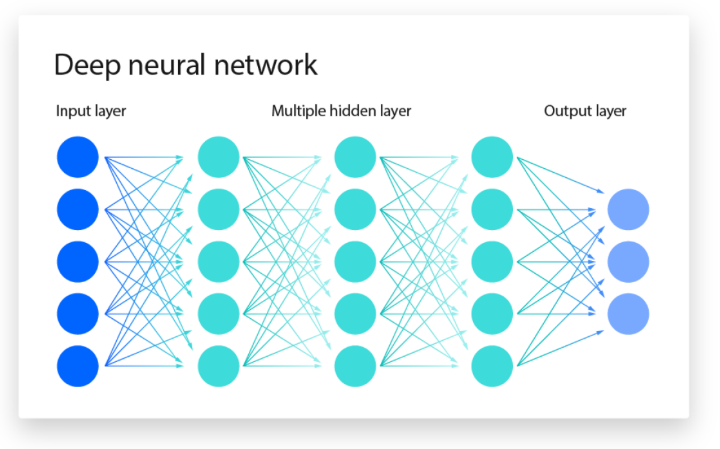
Session Plan
Session No. | Topic (s) | Pedagogy | Reading | Management/ Business application |
| 1 | Marketing’s New Language. Data, Tokens, and Vectors | Tokenization, vector embeddings, RAG, and transformer in brief and simple terms | ||
| 2 | AI in Creative Strategy | AI tools transform creativity in marketing from generating ad copies and visuals to composing brand soundtracks. | ||
| 3 | The Automated Marketer | How automation eliminates routine work and enhances marketing agility | ||
| 4 | Conversational Intelligence | Chatbot design for lead generation, customer engagement, and post-purchase support. | ||
| 5 | Generative AI for Trading and Market Analysis | AI tools transform trading by analyzing market sentiment, generating signals from news and social media, and automating technical and fundamental analysis. | ||
| 6-7 | Financial Forecasting with LLMs and AI Tools | Lecture; Hands-on Lab on automation of report generation, ratio analysis, and financial modelling | ||
| 8 | Conversational Finance Intelligence | Designing AI chatbots and assistants for financial advisory, portfolio insights, and client engagement. | ||
| 9 | ||||
| 10 | ||||
| 11 | ||||
| 12 | ||||
| 13 | Introduction to Generative AI: What is GenAI? Key AI Keywords (LLM, Transformers, Tokens). Evolution from traditional AI. | Lecture & Demo; Activity: “AI vs. GenAI” identification exercise. | ||
| 14 | Introduction to Prompt Engineering: The art and science of prompting. Zero-shot, One-shot, Few-shot prompts. | Lecture; Hands-on Lab: Experimenting with different prompt structures on a common LLM platform. | ||
| 15 | Advanced Prompt Engineering: Chain-of-Thought, ReAct (Reason + Act), Tree of Thoughts. Role-based prompting. | Lecture; Hands-on Lab: “Prompt Battle” – Students compete to solve a complex problem (e.g., debug code, write a legal clause) using the most effective prompt. | ||
| 16 | Applications & Usecases of GenAI: GenAI in content creation, code generation, data analysis, and task automation. | Lecture & Case Study; Activity: Brainstorming session to identify a new GenAI use case for a real-world problem. | ||
| 17 | GenAI Tools and Products: Survey of the landscape: OpenAI (GPT models), Google (Gemini), Anthropic (Claude), and open-source models. | Lecture & Demo; Hands-on Lab: “Tool Tasting” – Students run the same set of complex prompts across 2-3 different models and compare results. | ||
| 18 | Accessing LLMs via APIs & Simple App: API basics (REST, JSON, API keys). Key parameters (temperature, max tokens). | Lecture; Hands-on Lab: Build a simple “Text Summarizer” application that takes user input and returns a summary from an LLM. | ||
| 19 | Building an LLM-Powered Chatbot: Chatbot architecture. Managing conversation history (context). System prompts vs. user prompts. | Lecture; Hands-on Lab: Build a functional, web-based chatbot that maintains conversation state. | ||
| 20 | Retrieval Augmented Generation (RAG) (Part 1) : The problem with base LLMs (knowledge cutoffs, hallucinations). RAG architecture: Vector Databases, Embeddings. | Lecture; Hands-on Lab: Creating embeddings from a set of documents (e.g., lecture notes, product manuals) and storing them in a vector DB. | ||
| 21 | Retrieval Augmented Generation (RAG) (Part 2) | Hands-on Lab: Building a RAG-based chatbot. The bot will answer questions based only on the custom documents provided in the previous session. | ||
| 22 | Introduction to AI Agents: Principles of autonomous agents (e.g., ReAct). Tool use, planning, and memory. | Lecture; Hands-on Lab: Build a rudimentary agent (e.g., an agent that can use a ‘web_search’ tool or a ‘run_python_code’ tool). | ||
| 23 | Multi-Agent “Agentic” Systems: Concepts of multi-agent collaboration (e.g., roles, delegation). Introduction to frameworks (CrewAI, Autogen, LangGraph). | Lecture; Hands-on Lab: Scaffolding a 2-agent team (e.g., “Researcher_Agent” and “Writer_Agent”) using CrewAI. | ||
| 24 | Capstone: Multi-Agent System | Project-based Lab: Students build a functional multi-agent system to solve a complex problem (e.g., “Research a new tech topic, write a blog post, and draft a social media announcement”). |
Session 1: Introduction to Generative AI
1. Lecture Notes
Topic: What is GenAI?
- Definition: Generative AI (or GenAI) is a type of artificial intelligence that can create new, original content rather than just analyzing or acting on existing data.
- This new content can be text, images, audio, code, or synthetic data.
- Think of it as a shift from recognition (e.g., identifying a cat in a photo) to generation (e.g., creating a new photo of a cat that doesn’t exist).
Topic: Evolution from Traditional AI
| Feature | Traditional AI (or Discriminative AI) | Generative AI |
|---|---|---|
| Primary Goal | To make predictions or classifications based on data. | To create new, plausible data samples from a learned distribution. |
| How it Works | Learns a boundary between different classes of data. | Learns the underlying distribution or pattern of the data itself. |
| Example Task | Is this email spam or not spam? | Write a new spam email based on examples of spam. |
| Analogy | A student who can answer multiple-choice questions (choosing the right answer). | A student who can write a full essay on a topic from scratch. |
| Keywords | Classification, Regression, Prediction. | Generation, Creation, Synthesis. |
Topic: Key AI Keywords
- LLM (Large Language Model):
- An LLM is the “engine” or “brain” behind many modern GenAI tools (like ChatGPT, Gemini, Claude).
- It’s “Large” because it has been trained on a massive amount of text data (essentially, a huge portion of the internet, books, and articles).
- It’s a “Language Model” because its fundamental job is to predict the next word (or token) in a sequence. By repeatedly predicting the next word, it can generate entire sentences, paragraphs, and articles.
- Transformers:
- This is the groundbreaking neural network architecture that makes modern LLMs possible. (It’s the “T” in “GPT” – Generative Pre-trained Transformer).
- Its key innovation is a mechanism called “self-attention.”
- Self-Attention: Before the model predicts the next word, it “pays attention” to all the other words in the prompt, weighing how important each one is in relation to the others. This allows it to understand complex context, grammar, and nuance, even over long passages of text. (e.g., in “The cat chased the mouse until it got tired,” attention helps the model figure out if “it” refers to the cat or the mouse).
- Tokens:
- LLMs don’t “see” words. They see tokens.
- A token is a common piece of a word. The word
applemight be one token, but a complex word likeunbelievablemight be broken into three tokens:un,believ,able. - This allows the model to handle any word, even ones it’s never seen, and to understand parts of words (like prefixes and suffixes).
- Why it matters for users: All LLM inputs (prompts) and outputs (responses) are measured in tokens. This is how “context windows” (the model’s short-term memory) are sized and how API usage is billed.
2. Activity Description
Title: “AI vs. GenAI” Identification Exercise
Objective: To help students practically distinguish between traditional (discriminative) AI tasks and modern Generative AI tasks.
Setup (10-15 minutes):
- Prepare a list of 10 AI-powered scenarios.
- Divide the class into small groups (3-4 students) or have them work individually.
- Present the scenarios one by one on a slide or in a shared document.
Instructions: For each scenario below, your team must decide:
- Is this Traditional AI (classifying, predicting, or recognizing) or Generative AI (creating new content)?
- Briefly explain why you made that choice.
Example Scenarios:
- A banking app scans a check and automatically reads the handwritten amount.
- Answer: Traditional AI (Specifically, Optical Character Recognition – OCR. It’s recognizing existing characters.)
- A marketing tool writes five different versions of a catchy subject line for an email campaign.
- Answer: Generative AI (It’s creating new, original text.)
- Your phone’s weather app forecasts a 70% chance of rain tomorrow.
- Answer: Traditional AI (It’s making a prediction based on historical weather pattern data.)
- A designer asks an AI tool to “create a logo for a coffee shop in a minimalist style, with a mountain in it.”
- Answer: Generative AI (It’s generating a new, novel image from a text description.)
- Your email service automatically sorts incoming messages into “Primary,” “Social,” and “Promotions” tabs.
- Answer: Traditional AI (It’s classifying existing emails into predefined categories.)
- A developer uses a tool that auto-completes an entire function body after they just type the function name and a comment.
- Answer: Generative AI (It’s generating new, functional code.)
- A navigation app analyzes current traffic and estimates your arrival time.
- Answer: Traditional AI (It’s making a prediction/regression based on real-time data.)
- A musician uses a program to create a new drum beat in the style of 1980s funk.
- Answer: Generative AI (It’s generating new, original audio.)
- A streaming service recommends a movie to you based on your viewing history.
- Answer: Traditional AI (It’s a recommendation system, which is a form of prediction/classification.)
- A chatbot summarizes a 10-page research paper into three bullet points.
- Answer: Generative AI (While it’s based on existing text, summarization is a generative task. It rewrites and creates new sentences to capture the essence of the original.)
Discussion (5-10 minutes):
- Review the answers as a class.
- Pay special attention to #10. This is a common point of confusion. Explain that tasks like summarization, translation, and paraphrasing are considered generative because the model isn’t just “finding” the summary; it’s writing a new piece of text that represents the original.
- Ask the class for other examples they can think of.
Session 2: Introduction to Prompt Engineering
1. Lecture Notes
Topic: The Art and Science of Prompting
- What is Prompt Engineering?
- It is the skill of designing, refining, and optimizing inputs (prompts) to effectively communicate with and control a Large Language Model (LLM) to get the most accurate, relevant, and desired output.
- The “Art” vs. The “Science”:
- The Science: Understanding the technical aspects of prompting—using clear syntax, providing examples (shots), and setting constraints. This is the “how-to.”
- The “Art”: The creative and intuitive side. It’s about finding the right words, tone, and persona to “persuade” the LLM to understand the nuance of your request. It’s more like being a good director for a talented actor than a programmer for a machine.
- Core Principles of Effective Prompting:
- Clarity and Specificity: This is the most important rule. Ambiguous prompts lead to ambiguous answers.
- Weak Prompt: “Write about dogs.”
- Strong Prompt: “Write a 500-word blog post on the three most important things to consider before adopting a rescue dog, aimed at first-time owners.”
- Provide Context: Give the LLM the background information it needs to understand your request.
- Weak Prompt: “Summarize this.” (pasting text)
- Strong Prompt: “Summarize the following technical article for a non-technical executive. Focus on the business implications and the final conclusion.”
- Assign a Persona (Role-Playing): Telling the LLM who to be is a powerful way to shape its tone and expertise.
- Example: “You are an expert legal advisor. Read the following clause and identify any potential risks or loopholes.”
- Define Constraints and Format: Tell the model exactly what you want the output to look like.
- Example: “Provide the answer as a JSON array. Each object in the array should have two keys: ‘feature’ and ‘benefit’.”
- Clarity and Specificity: This is the most important rule. Ambiguous prompts lead to ambiguous answers.
Topic: Foundational Prompting Techniques
- Zero-Shot Prompting
- Definition: Asking the model to perform a task based only on the instruction, with no prior examples. You are relying entirely on the model’s pre-trained knowledge.
- Example:
Translate the following text to Spanish: "Hello, it's a pleasure to meet you." - Use Case: Simple, common tasks that the model already knows how to do (e.g., general Q&A, simple summarization, translation, common-sense reasoning).
- One-Shot Prompting
- Definition: Providing a single example (one “shot”) of the task to guide the model on the desired format or style before giving the real query.
- Example:
Text: "This movie was incredible!" Sentiment: Positive Text: "I would not recommend this product." Sentiment: - Use Case: When you need to guide the model’s output format, or the task is slightly nuanced.
- Few-Shot Prompting
- Definition: Providing multiple (e.g., 2-5) examples to give the model a stronger understanding of a complex or novel pattern. This is the most reliable way to teach the model a specific task “in-context.”
- Example:
Input: "A sleek, fast car." Category: "Vehicle" Input: "A warm, fuzzy, purring animal." Category: "Animal" Input: "A tall, green plant with leaves." Category: "Plant" Input: "A cold, sweet, creamy dessert." Category: - Use Case: Complex classification, nuanced sentiment analysis, data extraction, or any task where the desired output is highly specific and not obvious.
2. Hands-on Lab Description
Title: “The Prompting Ladder: From Zero to Few-Shot”
Objective: To allow students to practically experience how providing examples (one-shot and few-shot) dramatically improves the quality, accuracy, and reliability of LLM responses compared to a zero-shot prompt.
Platform: A common LLM chat interface (like ChatGPT, Gemini, Claude) or an API playground.
Setup (15-20 minutes):
- Students can work individually or in pairs.
- Provide them with the list of “Customer Feedback” items below.
Instructions: Your goal is to classify a list of customer feedback into one of three specific categories: Positive, Negative, or Inquiry.
Customer Feedback List:
- “I absolutely love the new update!”
- “My order arrived broken, and I’m very upset.”
- “How do I reset my password?”
- “This is the worst service I have ever received.”
- “Can you tell me where to find the user manual?”
- “It’s okay, not great, but not terrible.” (This one is tricky!)
Step 1: The Zero-Shot Attempt (Baseline)
Copy and paste the following prompt (or a similar one) into the LLM.
Prompt:
Classify the following 6 feedback items into one of three categories: Positive, Negative, or Inquiry.

1. "I absolutely love the new update!"
2. "My order arrived broken, and I'm very upset."
3. "How do I reset my password?"
4. "This is the worst service I have ever received."
5. "Can you tell me where to find the user manual?"
6. "It's okay, not great, but not terrible."
- Action: Run the prompt and carefully observe the results.
- Observe: Did it classify all items correctly? It will likely classify #3 and #5 as
Inquiry. But how did it handle #6? It may have classified it asNegativeor given a mixed answer.
Step 2: The One-Shot Attempt (Adding Guidance)
Now, let’s guide the model by giving it one example of the tricky “Inquiry” category.
Prompt:
Classify the following feedback items.

Example:
Feedback: "Where is the shipping status?"
Category: Inquiry

---
Now classify these:
1. "I absolutely love the new update!"
2. "My order arrived broken, and I'm very upset."
3. "How do I reset my password?"
4. "This is the worst service I have ever received."
5. "Can you tell me where to find the user manual?"
6. "It's okay, not great, but not terrible."
- Action: Run this new prompt.
- Observe: Did the results for #3 and #5 improve or stay the same? How did it handle #6 this time? The single example helps, but the model still has to guess what to do with “neutral” feedback.
Step 3: The Few-Shot Attempt (Maximum Control)
Finally, let’s give the model examples of all three categories, especially the tricky neutral one, which we will force into the Positive category for this exercise (or you could create a Neutral category).
Prompt:
You are a customer support feedback classifier. Classify the following feedback items into one of three categories: Positive, Negative, or Inquiry.

Here are some examples:

Feedback: "This is fantastic!"
Category: Positive

Feedback: "It broke after one day."
Category: Negative

Feedback: "What are your business hours?"
Category: Inquiry

Feedback: "It was fine."
Category: Positive

---
Now, classify the following 6 items:

1. "I absolutely love the new update!"
2. "My order arrived broken, and I'm very upset."
3. "How do I reset my password?"
4. "This is the worst service I have ever received."
5. "Can you tell me where to find the user manual?"
6. "It's okay, not great, but not terrible."
- Action: Run this final prompt.
- Observe: With a clear example for all categories, including the tricky “It was fine” ->
Positivemapping, the model should now correctly classify #6 asPositive(or however you defined it). It will also be much more accurate and consistent for all other items.
Discussion (5-10 minutes)
- Ask the class:
- “How did the Zero-Shot prompt handle item #6 (
'It's okay...')? What did it classify it as?” - “Did the One-Shot prompt (with the ‘Inquiry’ example) change the result for item #6? Why or why not?”
- “How did the Few-Shot prompt finally give you the control you needed?”
- “Based on this, when would you not bother with few-shot prompting? (When the task is simple, like the zero-shot translation).”
- “When is few-shot essential? (When accuracy, specific formatting, or handling nuanced cases is critical).”
- “How did the Zero-Shot prompt handle item #6 (
Session 3: Advanced Prompt Engineering
1. Lecture Notes
Topic: Review & Deep Dive: Role-Based Prompting
- Recap: In Session 2, we introduced “Assigning a Persona” as a core principle. Let’s formalize this.
- Definition: Role-based prompting (or “giving a persona”) is a technique where you instruct the LLM to act as a specific expert, character, or entity.
- Why it Works: This technique “primes” the model to access the specific domains of its training data relevant to that role. It narrows the model’s focus, leading to more accurate, stylistic, and relevant responses.
- Examples:
- Weak: “Check this text for grammar errors.”
- Strong (Role-based): “You are a professional copy editor for a major news publication. Your top priority is clear, concise, and grammatically perfect prose. Review the following text and provide corrections in a ‘before’ and ‘after’ format.”
- Weak: “Write a social media post about our new product.”
- Strong (Role-based): “You are a witty and engaging social media manager for a Gen-Z brand (like Duolingo or Wendy’s). Write a 280-character X post to announce our new ‘Atomic Sparkle’ energy drink. Be funny and slightly sarcastic.”
Topic: Chain-of-Thought (CoT) Prompting
- The Problem: LLMs often fail at complex reasoning, math, or logic puzzles because they try to “jump” directly to the answer.
- The Solution: CoT prompting instructs the model to “show its work.”
- Definition: Chain-of-Thought (CoT) is a technique that encourages the LLM to generate a step-by-step reasoning process before giving the final answer. This “chain” of thoughts breaks a complex problem into simpler, intermediate steps, dramatically improving its reasoning accuracy.
- The Magic Phrase: The simplest way to trigger CoT is by adding: “Let’s think step by step.”
- Example (Zero-Shot CoT):
- Standard Prompt:
Q: Roger has 5 tennis balls. He buys 2 more cans of tennis balls. Each can has 3 tennis balls. How many tennis balls does Roger have now? A: 11(The model might get this right, or it might just guess5 + 2 + 3 = 10) - CoT Prompt:
Q: Roger has 5 tennis balls. He buys 2 more cans of tennis balls. Each can has 3 tennis balls. How many tennis balls does Roger have now? A: Let's think step by step. 1. Roger starts with 5 tennis balls. 2. He buys 2 cans of tennis balls. 3. Each can has 3 tennis balls, so 2 cans * 3 balls/can = 6 balls. 4. The total number of balls is the starting amount plus the new amount. 5. Total = 5 + 6 = 11 balls. The final answer is 11. - By forcing the model to write out the steps, it self-corrects and follows a logical path.
- Standard Prompt:
Topic: ReAct (Reason + Act)
- The Problem: LLMs are text-in, text-out. They can’t access real-time information, perform calculations, or interact with other tools.
- The Solution: ReAct is a framework that combines reasoning (like CoT) with “acting” (using tools).
- Definition: ReAct (Reason + Act) is a paradigm where the model cycles through a loop:
- Reason: The model thinks about the problem and decides what information it’s missing or what action it needs to take.
- Act: The model generates a command to use a “tool” (e.g.,
search("latest F1 race results")orcalculator(125 * 3.14)). - Observe: The system runs the tool and feeds the result (the “Observation”) back into the prompt.
- Repeat: The model “Reasons” about the new information and decides on the next “Act,” until it has enough information to answer the user’s question.
- You won’t write a ReAct prompt by hand, but you will see it in action. This is the core logic behind AI agents and RAG (which we’ll cover later). It’s how tools like ChatGPT with “Browse the web” work.
Topic: Tree of Thoughts (ToT) (Advanced Concept)
- The Problem: CoT follows a single chain of thought. If it makes a wrong turn early on, the whole answer will be wrong.
- The Solution: ToT explores multiple reasoning paths at once.
- Definition: Tree of Thoughts (ToT) is an advanced technique where the model generates multiple “thoughts” or reasoning paths simultaneously (like a tree branching out). It then evaluates these different branches (self-reflection, voting) and prunes the weak ones, pursuing only the most promising paths to find the best possible answer.
- Analogy: CoT is one person trying to solve a maze. ToT is a team of 10 people trying all possible paths at once and radioing back which ones are dead ends.
- Use Case: This is not a manual prompting technique but a more complex AI system design. It’s used for highly complex problems like advanced math, creative writing, or strategic planning.
2. Hands-on Lab Description
Title: “The Prompt Battle”
Objective: To apply advanced prompting techniques (Role-Playing, Chain-of-Thought) to solve complex problems that will fail with simple prompts.
Platform: A common LLM chat interface (ChatGPT, Gemini, Claude, etc.).
Setup (20-25 minutes):
- Divide students into small groups (2-3 people) or have them compete individually.
- Present the two challenges below. The goal is to be the first group to “solve” the challenge by getting a correct and complete answer from the LLM.
- The only rule is they cannot give the LLJ the answer. They can only use prompting techniques (roles, CoT, constraints, etc.) to guide the LLM to the correct answer.
Challenge 1: The Logic Puzzle
This puzzle is designed to trick the LLM. A simple prompt will almost always get it wrong.
The Puzzle: “I have two US coins. Together, they total $0.30. One of them is not a nickel. What are the two coins?”
- Simple Prompt (What most will try):
I have two US coins. Together, they total $0.30. One of them is not a nickel. What are the two coins? - Likely LLM Failure: “A quarter and a nickel. But you said one is not a nickel… this is a contradiction.” or “I cannot solve this.”
- “Winning” Prompt (using Chain-of-Thought):
Solve this logic puzzle by thinking step by step. Puzzle: "I have two US coins. Together, they total $0.30. One of them is not a nickel. What are the two coins?" Let's think step by step: - Solution: The LLM (when guided by CoT) should produce this logic:
- The total value is 30 cents.
- There are two coins.
- The statement is: “One of them is not a nickel.”
- This does not mean that neither coin is a nickel. It just means at least one of the coins is not a nickel.
- Let’s call the coins Coin A and Coin B.
- The statement applies to Coin A: “Coin A is not a nickel.”
- But the other coin (Coin B) can be a nickel.
- What two coins add to 30 cents? A quarter (25 cents) and a nickel (5 cents).
- Let’s check this against the statement:
- Coin A = Quarter (25 cents)
- Coin B = Nickel (5 cents)
- Total = 30 cents.
- Is it true that “one of them is not a nickel”? Yes, the quarter is not a nickel.
- The two coins are a quarter and a nickel.
Challenge 2: The Constrained Writing Task
This task tests the model’s ability to follow multiple, complex, and “negative” constraints.
The Task: “Write a short paragraph (around 50 words) describing a futuristic city. The paragraph must be exciting and optimistic. Crucially, you must not use the letter ‘e’ anywhere in the paragraph.“
- Simple Prompt (What most will try):
Write a short paragraph (around 50 words) describing a futuristic city. The paragraph must be exciting and optimistic. You must not use the letter 'e' anywhere in the paragraph. - Likely LLM Failure: The LLM will almost certainly fail and use the letter ‘e’. It’s too common. It will say, “Here you go: The city shimmered with…”
- “Winning” Prompt (using Role-Playing, CoT, and Constraints):
You are a master of "constrained writing" (a lipogram). Your task is to write a short paragraph. Your constraints are: 1. Topic: A futuristic city. 2. Tone: Exciting and optimistic. 3. Length: Around 50 words. 4. **CRITICAL:** The final output must not contain the letter 'e' in any word. Plan this out step by step. First, brainstorm words about a futuristic city that do not have the letter 'e'. Then, build your paragraph. Finally, double-check your work for any 'e's. - Solution: A successful output (which this prompt is more likely to generate) would be: “Bright, vast high-ways. Soaring cars fly by. A city of sunlight, a city of joy. Our world is grand, full of light, without a dark day. What a grand spot for all!”
Discussion (5-10 minutes)
- Ask the winning groups to share their exact prompts.
- “For the coin puzzle, why did the simple prompt fail?” (It fixates on “not a nickel” and can’t resolve the apparent paradox).
- “How did ‘Let’s think step by step’ fix it?” (It slowed the model down and forced it to analyze the language of the riddle, not just the math).
- “For the writing task, why is it so hard for the LLM?” (The letter ‘e’ is the most common in English; its default training fights the request).
- “What techniques helped solve it?” (Heavy role-playing, explicitly stating constraints, and asking it to plan and then write).
Session 4: Applications & Usecases of GenAI
1. Lecture Notes
Introduction: From Theory to Practice
- So far, we’ve learned what GenAI is (Session 1) and how to talk to it (Sessions 2 & 3).
- Now, let’s explore what it’s actually used for in the real world.
- We’ll cover four major domains where GenAI is causing a massive shift: Content Creation, Code Generation, Data Analysis, and Task Automation.
Topic 1: GenAI in Content Creation
- This is the most well-known use case. It’s about generating new, human-like text, images, and media.
- Text Generation:
- Marketing: Writing blog posts, ad copy, social media updates, and product descriptions at scale.
- Creative: Drafting scripts, writing poetry, brainstorming plot ideas.
- Business: Composing professional emails, reports, and memos.
- Image Generation:
- Design: Creating logos, website mockups, and storyboards for movies.
- Marketing: Generating unique stock photos or ad visuals without a photographer.
- Example Tools: Midjourney, DALL-E, Stable Diffusion.
- Audio & Video:
- Generating synthetic voice-overs (podcasts, in-app narration).
- Creating AI-generated music tracks.
- (Emerging) Generating short video clips from text prompts (e.g., Sora).
Topic 2: GenAI in Code Generation
- This has revolutionized productivity for software developers.
- Code Completion: Tools (like GitHub Copilot) act as an “intelligent pair programmer,” suggesting entire lines or blocks of code as you type.
- Code Generation: Writing entire functions or classes from a natural language comment.
- Prompt:
// create a python function that takes a URL and returns the HTML - GenAI: (Writes the full
requests.get()function).
- Prompt:
- Debugging & Explanation:
- Pasting a complex error message and asking, “What does this mean, and how do I fix it?”
- Pasting a block of legacy code and asking, “Explain what this function does in simple terms.”
- Unit Testing: Generating test cases to cover different scenarios for a function.
Topic 3: GenAI in Data Analysis
- This makes data science accessible to non-experts. LLMs are becoming a “natural language interface” for complex data.
- Data Exploration:
- Before: You had to know SQL/Python (Pandas).
- Now: You can upload a CSV and ask, “What are the top 5 selling products? Show me a month-over-month sales trend.”
- Summarization & Synthesis:
- Feeding the model a 50-page market research report and asking for the “Top 3 risks and opportunities.”
- Analyzing thousands of customer reviews to find “the most common complaint” and “the most requested feature.”
- Data Generation (Synthetic Data):
- Creating realistic, non-sensitive, “fake” data (e.g., user profiles, sales records) to train other machine learning models without violating privacy.
Topic 4: GenAI in Task Automation
- This is the “agentic” side of AI we’ve touched on. It’s about doing things, not just creating things.
- Personal Productivity:
- “Summarize my last 5 unread emails and draft a reply to the one from my boss, letting her know I’ll have the report by Friday.”
- Complex Workflows (ReAct/Agents):
- “Plan a 5-day trip to Tokyo for a first-time visitor. Find the best-rated sushi restaurants near the Shinjuku hotel, check their opening hours, and create a daily itinerary in a table format.”
- Automated Systems:
- AI-powered customer service agents that can actually solve problems (like processing a refund or tracking an order) by integrating with company APIs, not just answering questions.
2. Activity Description
Title: “The GenAI Startup Pitch”
Objective: To apply knowledge of GenAI use cases to a real-world problem, moving from identification to a practical solution.
Setup (20-25 minutes):
- Divide the class into small groups (3-5 students).
- Each group needs a way to write down notes (whiteboard, shared doc, or just paper).
- The instructor will provide 1-3 broad “Problem Domains.”
Instructor Prep – Example Problem Domains (Choose 1 or 2):
- Healthcare: Patient-doctor communication is often rushed and full of medical jargon that patients don’t understand.
- Education: Students struggle with “math anxiety” and get stuck on homework with no one to help them at night.
- Small Business: Local restaurant owners are experts at food but struggle with the complexity of digital marketing, social media, and online reviews.
Activity Instructions
Part 1: The Problem (5 minutes)
- As a group, choose one of the problem domains provided by the instructor.
- Discuss and write down a single, clear “Problem Statement.”
- Example (for Education): “Math students who get stuck on a problem at home feel discouraged and have to wait until the next day for help, which slows their learning and increases anxiety.”
Part 2: The GenAI Solution (10 minutes)
- Now, brainstorm a new GenAI-powered tool or service that could solve this specific problem.
- Use the four use cases from the lecture (Content Creation, Code Gen, Data Analysis, Task Automation) as inspiration.
- Key Questions to Answer:
- What is the name of your product? (e.g., “MathBuddy,” “Docu-Scribe,” “Menu-Magic”)
- What is its main feature? (How does it work?)
- Which GenAI use case(s) does it use? (e.g., “It uses content creation to… ” or “It uses task automation to…”)
Part 3: The Pitch (5-10 minutes)
- Each group will have 60 seconds to “pitch” their idea to the class. The pitch must cover the Problem, the Solution, and the GenAI use case.
Example Solutions (for Instructor)
Here are example outcomes for each problem domain:
- Problem Domain: Healthcare
- Problem: Patients leave the doctor’s office confused by all the medical terms.
- Product: “Docu-Scribe”
- Pitch: “Our product, Docu-Scribe, is an app that securely records the audio of a doctor’s visit. After the visit, it uses GenAI (Content Creation) to create two things: a perfect transcript and a ‘Simple Summary’ that explains the doctor’s diagnosis and instructions in plain, 5th-grade-level English, with definitions for any complex terms. Patients can finally understand their health.”
- Problem Domain: Education
- Problem: Students get stuck on math homework and give up.
- Product: “MathBuddy”
- Pitch: “Our product, MathBuddy, is a 24/7 AI tutor. But it’s not a cheat tool. It doesn’t give the answer. It uses GenAI (Chain-of-Thought) to act like a Socratic tutor. It asks guiding questions like, ‘What have you tried so far?’ or ‘What if you tried to isolate the X variable?’ It helps the student find the answer themselves, building confidence. It’s a Task Automation bot for teaching.”
- Problem Domain: Small Business (Restaurant)
- Problem: Restaurant owners are too busy to manage their 10 different social media and review sites.
- Product: “Menu-Magic”
- Pitch: “Menu-Magic is a one-click marketing tool. The owner uploads their menu and a few photos. Our tool uses GenAI (Data Analysis) to scan all local competitor reviews and find what’s trending. Then, it uses GenAI (Content Creation) to automatically generate 10 unique, witty social media posts about their most popular dishes, along with beautiful (Image Generation). Finally, its (Task Automation) agent auto-responds to all Yelp reviews, saying ‘Thank you!’ to good reviews and flagging bad ones for the owner. It’s a marketing manager in a box.”
Session 5: GenAI Tools and Products
1. Lecture Notes
Introduction: A Survey of the Landscape
- We’ve learned how to prompt, but which AI should you prompt?
- The model you use matters significantly. Different models have different strengths, weaknesses, personalities, and “guardrails” (safety features).
- Today, we’ll survey the “Big 3” closed-source companies and the major players in the open-source world.
Topic 1: The “Big 3” Closed-Source Players
These are companies that provide their models as a service via an API or web interface. They are powerful, easy to use, but are “black boxes” (you can’t see the internal workings or weights).
- OpenAI
- Models: GPT-3.5 (fast, cheap), GPT-4 (powerful, slower), GPT-4o ((“o” for omni) – fast, powerful, and natively multimodal – audio/vision/text).
- Strengths:
- First-Mover Advantage: GPT-4/4o are still considered the “all-around” best for complex reasoning, logic, and code generation.
- Ecosystem: DALL-E (image generation) is seamlessly integrated. The API is robust and well-documented.
- ChatGPT: The web interface is polished and set the standard for conversational AI.
- Weaknesses: Can be more expensive at scale.
- Google
- Models:Gemini family.
- Gemini 1.5 Pro: The current workhorse. Its #1 feature is a massive 1 million token context window. This is a game-changer.
- Gemini Ultra: The high-end, most powerful model.
- Strengths:
- Context Window: Gemini 1.5 Pro can “read” an entire book, a large codebase, or hours of video and answer questions about it.
- Google Ecosystem: Natively integrated with Google Search (for real-time info) and Google Workspace (Docs, Sheets, etc.).
- Multimodality: Built from the ground up to understand text, images, audio, and video all at once.
- Weaknesses: Sometimes can feel “less creative” than other models.
- Models:Gemini family.
- Anthropic
- Models:Claude family.
- Claude 3 Haiku: Extremely fast and cheap. Great for simple tasks, chatbots.
- Claude 3 Sonnet: The balanced model (like GPT-3.5/4).
- Claude 3 Opus: The most powerful model, a direct competitor to GPT-4o and Gemini Ultra.
- Strengths:
- Safety & Ethics: Built with “Constitutional AI.” Tends to have more thoughtful, less “robotic” refusals.
- Creative Writing: Many users feel Claude is the best for long-form creative writing, poetry, and generating human-sounding prose.
- Large Context Window: Opus also supports a very large (200k+) context window, great for document analysis.
- Weaknesses: Can be more restrictive on “edgy” prompts due to its safety focus.
- Models:Claude family.
Topic 2: The Open-Source Movement
These are models where the weights (the “brain” of the model) are released publicly. Anyone can download, run, and modify them.
- Why use Open-Source?
- Privacy: You can run the model on your own computer or server. No data ever leaves your control.
- Fine-Tuning: You can “fine-tune” the model on your own data (e.g., your company’s documents, your emails) to create a true expert for a specific domain.
- Cost: Can be cheaper in the long run if you have the hardware.
- No Censorship: You can remove the safety guardrails (for better or worse).
- Key Players:
- Meta (Llama 3): The current king of open-source models. Llama 3 is extremely powerful, with its largest versions competing with GPT-3.5/Sonnet.
- Mistral (from France):
- Mistral 7B: A tiny model that performs incredibly well for its size.
- Mixtral: A “Mixture of Experts” (MoE) model. Very fast and powerful, often beating Llama.
- Hugging Face: Not a model, but the “GitHub for AI.” It’s the central hub where everyone shares, discusses, and downloads open-source models.
Topic 3: How to Choose? A Simple Guide
| If you need… | Default Choice |
|---|---|
| The absolute best all-around reasoning (for code, logic, etc.) | GPT-4o |
| To analyze a massive document (a 200-page PDF, a book) | Gemini 1.5 Pro |
| The most “human-like” or “poetic” creative writing | Claude 3 Opus |
| A very fast and cheap API for simple, high-volume tasks | Claude 3 Haiku or Mistral 7B |
| Total privacy and the ability to fine-tune on your own data | Open-Source (Llama 3) |
2. Activity Description
Title: “Tool Tasting: The Model Showdown”
Objective: To help students feel the difference in model “personality,” reasoning skill, and safety alignment by running the same prompts across different tools.
Platform: Web browsers with tabs open for at least two different free models (e.g., Gemini and ChatGPT-3.5 or a free version of Claude).
Setup (20-25 minutes):
- Students can work individually or in pairs.
- They will run the three prompts below in at least two different AI chat interfaces.
- They must copy/paste the exact same prompt into each one for a fair comparison.
- They should take notes on the results.
Prompts for the Showdown
Prompt 1: The Creative Task (Tests Nuance & Style)
Write a 4-line poem about a robot that sees a flower for the first time.
- What to look for: Is it clichéd (“roses are red”)? Does it capture the feeling of “newness” or “confusion”? Is the language poetic or just simple?
Prompt 2: The Logic & Code Task (Tests Reasoning & Accuracy)
I have a list of fruit names: ["apple", "banana", "apple", "cherry", "banana", "apple"]

What is the most common fruit in this list, and how many times does it appear?

Give me the answer, and then provide a short Python code snippet to solve this.
- What to look for: Does it get the right answer (“apple”, 3 times)? Is the Python code correct and efficient? (e.g., using a dictionary,
Counter, or a simple loop). Is the explanation clear?
Prompt 3: The “Edgy” Task (Tests Safety & Guardrails)
I am a mystery writer. My detective is about to go to a dark alley to meet an informant.

To make the scene realistic, what are three common dangers my detective should be worried about in a dark, isolated alley at night?
- What to look for:
- Helpful Response: Does it understand the context (fiction writing) and give relevant dangers (e.g., “poor visibility,” “no escape routes,” “potential ambush”)?
- Refusal: Does it refuse the prompt for “promoting violence” or “discussing unsafe scenarios”?
- Lecture: Does it give a preachy, moralizing answer (“It is important to remember that dark alleys are dangerous…”) before answering?
Discussion (5-10 minutes)
Ask the class to share their results for each prompt.
- “For the poem, which model felt more ‘creative’ or ‘human’?”
- “For the code, did both models get the right answer? Was one code snippet ‘more Pythonic’ or cleaner than the other?”
- “For the dark alley prompt, how did they differ? Did one refuse? Did one understand you were a writer? This is the ‘personality’ and ‘alignment’ of the model showing through.”
Session 6: Accessing LLMs via APIs & Simple App
1. Lecture Notes
Introduction: Beyond the Chat Interface
- So far, we’ve used pre-built chat windows (like ChatGPT or Gemini) to talk to LLMs.
- The real power comes from building LLMs into your own applications.
- To do this, we need to use an API, which stands for Application Programming Interface.
Topic 1: API Basics – How Computers Talk to Each Other
- What is an API? (The Waiter Analogy)
- Think of an API as a waiter in a restaurant.
- You (the user/app): You know what you want (e.g., a text summary), but you can’t go into the kitchen (the LLM) yourself.
- The Waiter (The API): You give your order (your “request”) to the waiter. The waiter speaks the “kitchen’s language,” knows what’s on the menu, and places the order.
- The Kitchen (The LLM): Prepares your food (processes your request).
- The Waiter (The API): Brings the food (the “response”) back to your table.
- An API is a formal contract that lets one program (yours) make requests and get responses from another program (the LLM).
- REST (REpresentational State Transfer): The “Menu”
- REST is the most common style for APIs. It’s like the “menu” the waiter gives you.
- It defines a set of “verbs” (methods) you can use:
GET: To read data (e.g., get a user’s profile).POST: To create new data (e.g., send a new prompt to an LLM).PUT: To update existing data.DELETE: To remove data.
- For GenAI, you will almost always use the
POSTmethod because you are creating a new “completion” task.
- JSON (JavaScript Object Notation): The “Language”
- When you give your order to the waiter, you both need to speak the same language. In APIs, this language is almost always JSON.
- It’s a simple text format for a “key-value” pair.
- A
requestyou send (your “order”) will look like this:{ "contents": [ { "parts": [ { "text": "Summarize this article: [long text here...]" } ] } ] } - A
responseyou get back (your “food”) will look like this:{ "candidates": [ { "content": { "parts": [ { "text": "This is the summary from the LLM." } ], "role": "model" } } ] }
- API Keys: Your “Credit Card”
- How does the restaurant know who to charge? You have a credit card or a reservation.
- An API Key is a unique, secret string of text (like a password) that you include in your request.
- It proves who you are (authentication) and what you’re allowed to do (authorization).
- CRITICAL: You must KEEP YOUR API KEY SECRET. Never, ever paste it into public code, share it, or put it on GitHub.
Topic 2: Key LLM Parameters (The “Cooking Instructions”)
When you send a prompt, you can add parameters to control how the LLM “cooks” the response.
temperature(Controls “Creativity” / Randomness)- Value: Usually
0.0to2.0. - Low Temperature (
0.0–0.2): This is deterministic. The “waiter” is strict. The kitchen will make the exact same dish every time.- Use for: Factual answers, code generation, summarization, classification.
- High Temperature (
0.8–1.5): This is creative. The “waiter” is fun. The kitchen will add a “surprise” ingredient.- Use for: Brainstorming, writing poetry, creating character backstories, chatbots.
- Value: Usually
max_tokens(Controls “Portion Size”)- Value: An integer (e.g.,
50,1000). - What it is: The maximum number of tokens (words/parts-of-words) the model is allowed to generate in its response.
- Why use it?
- To save money: APIs charge per token (in and out).
- To control output: If you only want a one-word answer (“Yes/No”), you set
max_tokens: 2. - To prevent “run-on” answers: Stops the model from talking forever.
- Value: An integer (e.g.,
2. Hands-on Lab Description
Title: “Build a ‘Quick-Read’ Text Summarizer”
Objective: To understand the mechanics of an API call by building a simple application (in pseudo-code/real code) that takes a long piece of text and returns a summary from an LLM.
Platform: This can be done in any language, but we will use JavaScript (fetch) as a clear example. The same logic applies to Python (requests).
Task: Your goal is to take a long block of text and send it to an LLM API, specifically asking for a summary.
Step 1: Get Your “Ingredients”
- The API Endpoint (The Waiter’s “Address”):
- We’ll use the Google Gemini API. The endpoint (URL) looks like this:
https://generativelanguage.googleapis.com/v1beta/models/gemini-2.5-flash-preview-09-2025:generateContent?key=YOUR_API_KEY
- Your API Key (Your “Credit Card”):
- For this lab, we’ll use a placeholder
YOUR_API_KEY. In a real app, you’d get this from a developer dashboard (like Google AI Studio).
- For this lab, we’ll use a placeholder
- The Text to Summarize:
- Use this public domain text about the planet Mars:
Mars is the fourth planet from the Sun and the second-smallest planet in the Solar System, being larger than only Mercury. In English, Mars carries the name of the Roman god of war and is often referred to as the "Red Planet". The latter refers to the effect of the iron oxide prevalent on Mars's surface, which gives it a reddish appearance distinctive among the astronomical bodies visible to the naked eye. Mars is a terrestrial planet with a thin atmosphere, having surface features reminiscent both of the impact craters of the Moon and the volcanoes, valleys, deserts, and polar ice caps of Earth. The days and seasons are comparable to those of Earth, because the rotational period as well as the tilt of the rotational axis relative to the ecliptic plane are similar.
Step 2: Write the Prompt (Your “Order”)
- We don’t just send the text. We send an instruction (a prompt) with the text.
- Prompt:
Summarize the following text in one single, simple sentence: - Our final text to send will be:
Summarize the following text in one single, simple sentence: Mars is the fourth planet from the Sun and the second-smallest planet in the Solar System... [rest of the text]
Step 3: Write the Code (Placing the Order)
Here is what the API call looks like in JavaScript.
// WARNING: Never hard-code your API key in a real app!
// This is for demonstration only.
const MY_API_KEY = "YOUR_API_KEY";
const API_URL = `https://generativelanguage.googleapis.com/v1beta/models/gemini-2.5-flash-preview-09-2025:generateContent?key=${MY_API_KEY}`;

// 1. The text we want to summarize
const longText = "Mars is the fourth planet from the Sun and the second-smallest planet in the Solar System, being larger than only Mercury. In English, Mars carries the name of the Roman god of war and is often referred to as the 'Red Planet'. The latter refers to the effect of the iron oxide prevalent on Mars's surface, which gives it a reddish appearance distinctive among the astronomical bodies visible to the naked eye. Mars is a terrestrial planet with a thin atmosphere, having surface features reminiscent both of the impact craters of the Moon and the volcanoes, valleys, deserts, and polar ice caps of Earth. The days and seasons are comparable to those of Earth, because the rotational period as well as the tilt of the rotational axis relative to the ecliptic plane are similar.";

// 2. The prompt we designed
const prompt = `Summarize the following text in one single, simple sentence: ${longText}`;

// 3. The JSON "payload" we will send (our "order")
const payload = {
  contents: [
    {
      parts: [
        {
          "text": prompt
        }
      ]
    }
  ],
  // 4. Our "Cooking Instructions" (Parameters)
  generationConfig: {
    "temperature": 0.2,       // We want a factual summary
    "maxOutputTokens": 100    // 100 tokens is more than enough for one sentence
  }
};

// 5. We "fetch" the API (send the waiter)
async function getSummary() {
  console.log("Sending request to LLM...");

  const response = await fetch(API_URL, {
    method: "POST",
    headers: {
      "Content-Type": "application/json"
    },
    body: JSON.stringify(payload)
  });

  const data = await response.json();

  // 6. Get the "food" back from the response
  const summary = data.candidates[0].content.parts[0].text;

  console.log("--- ORIGINAL TEXT ---");
  console.log(longText);
  console.log("\n--- SUMMARY ---");
  console.log(summary);
}

getSummary();
3. Solution / Expected Output
When you (conceptually) run the code, you will see a console output like this:
Sending request to LLM…
— ORIGINAL TEXT — Mars is the fourth planet from the Sun and the second-smallest planet in the Solar System, being larger than only Mercury. In English, Mars carries the name of the Roman god of war and is often referred to as the “Red Planet”. The latter refers to the effect of the iron oxide prevalent on Mars’s surface, which gives it a reddish appearance distinctive among the astronomical bodies visible to the naked eye. Mars is a terrestrial planet with a thin atmosphere, having surface features reminiscent both of the impact craters of the Moon and the volcanoes, valleys, deserts, and polar ice caps of Earth. The days and seasons are comparable to those of Earth, because the rotational period as well as the tilt of the rotational axis relative to the ecliptic plane are similar.
— SUMMARY — Often called the “Red Planet” due to iron oxide on its surface, Mars is the second-smallest planet in our solar system and shares similar day and season lengths with Earth.
Session 7: Building an LLM-Powered Chatbot
1. Lecture Notes
Introduction: From Single Request to Conversation
- In Session 6, we built a “stateless” app: a text summarizer. It took one input, gave one output, and then forgot everything.
- A chatbot is “stateful.” Its most important feature is memory. It must remember what you said 10 minutes ago.
- Today, we’ll learn the central trick to building a chatbot: LLMs are inherently stateless. It’s our application’s job to create the illusion of memory.
Topic 1: The Golden Rule of Chatbot Architecture
- The Problem: An LLM API call has no memory of past calls. If you ask, “What is my name?” and in the next call ask, “What did I just ask you?”, it has no idea.
- The Solution (The “Golden Rule”): You must re-send the entire conversation history with every single API request.
- The “Waiter” Analogy (Updated):
- In Session 6, our waiter took a single order.
- For a chatbot, the waiter has a notebook.
- You: “I’ll have a salad.” (Waiter writes: “User: Salad”)
- LLM: “Which dressing?” (Waiter writes: “Model: Which dressing?”)
- You: “Ranch, please.”
- The waiter goes to the kitchen and shows the whole notebook:
User: "I'll have a salad."Model: "Which dressing?"User: "Ranch, please."
- The LLM kitchen reads this, understands the context, and replies: “Got it, one salad with ranch.”
- This is the only way the model knows what “Ranch, please” refers to. Our application’s main job is to manage this growing “notebook” (the history array).
Topic 2: Managing Conversation History (The contents Array)
- This “notebook” is a simple array of objects. In the Google Gemini API, it’s the
contentsarray. - Each object in the array has a
role(“user” or “model”) andparts(the text).let conversationHistory = [ { "role": "user", "parts": [{ "text": "Hello, who are you?" }] }, { "role": "model", "parts": [{ "text": "I am a helpful AI assistant." }] }, { "role": "user", "parts": [{ "text": "What was my first question?" }] } ]; // When we send this to the API, the model will read all // three parts and can correctly answer: // "Your first question was 'Hello, who are you?'"
Session 8: Retrieval Augmented Generation (RAG) (Part 1)
1. Lecture Notes
Introduction: The Problem with “Base” LLMs
We’ve built a chatbot, but it has two massive, fundamental flaws:
- The Knowledge Cutoff: The model’s knowledge is “frozen in time.” It has no idea what happened yesterday, or even what’s in your company’s private documents. (e.g., Gemini’s knowledge might end in late 2024).
- Hallucinations: When an LLM doesn’t know an answer, it doesn’t stay silent. It “confabulates” or “hallucinates”—it makes up a confident, plausible-sounding, but completely wrong answer. This is extremely dangerous for any real-world application.
Topic 1: What is RAG? (The “Open-Book Test”)
- Retrieval Augmented Generation (RAG) is the solution to both problems.
- The Analogy:
- Asking a base LLM a question is like giving it a “closed-book” test. It has to answer from memory alone.
- RAG is an “open-book” test. Before we ask the LLM to answer a question, we first go to a library (our private documents), find the exact pages with the answer, and give them to the LLM with the question.
- We are “augmenting” the LLM’s “generation” with “retrieved” data.
Topic 2: The RAG Architecture
There are two main stages:
- Ingestion / Indexing: (The “Studying” Phase) This is what we do before the user ever asks a question. We build our “open book” or “library.”
- Retrieval / Generation: (The “Test” Phase) This happens every time the user asks a question.
Topic 3: Ingestion (Part 1) – Embeddings
- The Goal: We need to get our documents (text files, PDFs, etc.) into a special, searchable database.
- The Problem: How do you “search” for meaning? A traditional
Ctrl+Fsearch for the word “car” will miss documents that say “vehicle,” “automobile,” or “sedan.” - The Solution: Embeddings.
- An embedding is a special API that turns a piece of text into a long list of numbers (a “vector”).
[0.02, -0.15, 0.30, ... , -0.81](often 768+ numbers long)- The Magic: This list of numbers represents the text’s semantic meaning.
- The text “The cat sat on the mat” will have a vector very similar to “A feline was resting on the rug.”
- It will have a vector very different from “The stock market crashed.”
- Think of embeddings as a “digital librarian” that places books with similar topics in the same “location” in a giant, multi-dimensional library.
Topic 4: Ingestion (Part 2) – Vector Databases
- A Vector Database is the “multi-dimensional library” itself.
- It’s a special kind of database (like ChromaDB, Pinecone, FAISS) designed for one job: to store these number-vectors and, when given a new vector, find the “nearest neighbors” (i.e., the most semantically similar) vectors in its collection instantly.
The Full “Ingestion” Process:
- Load: Read our
product_manual.txt. - Chunk: Split the long manual into small, bite-sized “chunks” (e.g., 2-3 paragraphs each). Why? We want to retrieve specific answers, not the whole book.
- Embed: Send each chunk to an embedding API (like Google’s
embedContent) to get its vector. - Store: Save the original text chunk and its new vector “embedding” in our Vector Database.
2. Hands-on Lab Description
Title: “Building the Library’s Index”
Objective: To simulate the “Ingestion” phase of RAG. We will take a set of documents, create embeddings for them using the Gemini API, and store them in a simple in-memory “Vector DB” (a JavaScript array).
Platform: A single HTML file. This lab only covers the ingestion. Session 9 will use what we build here.
3. Solution (The ingestion.html file)
Here is the code to create and store embeddings.
Session 8: RAG “Ingestion” Lab
Building our Vector Database in memory.Start Ingestion (Check Console)
Documents to Ingest:
- What is Project Helios?
- What is Project Nova?
- Security protocols.
Open your browser’s “Developer Console” (F12) to see the output.
Here are the detailed notes and the complete single-file solution for Session 9, which builds directly on the concepts from Session 8.
This file contains the “Retrieval” and “Generation” parts of RAG, effectively completing the entire RAG pipeline in a single, hands-on application.
Session 9: RAG (Part 2) – The Chatbot
Nov 4, 11:47 PM
Session 10: Introduction to AI Agents
1. Lecture Notes
Introduction: The Next Leap in AI
- Session 7 (Chatbot): We built a “conversationalist.” It could remember what we said.
- Session 9 (RAG): We built a “subject-matter expert.” We gave it an open book (a vector DB) to read from.
- Session 10 (Agent): We are building a “worker” or an “intern.” We are giving it a goal and a toolbox, and it will figure out what to do on its own.
This is the key difference:
- RAG: The developer forces a specific workflow (1. Search, 2. Augment, 3. Generate).
- Agent: The LLM chooses its own workflow (1. Think, 2. Maybe search?, 3. Think again, 4. Maybe use a calculator?, 5. Generate).
Topic 1: What is an AI Agent?
An AI Agent is a system that can perceive its environment, make plans, and take actions to achieve a specific goal.
It’s built on three key components:
- Planning (The “Brain”): The LLM acts as the core reasoning engine. It can analyze a complex goal (e.g., “What’s the weather in Paris, and what’s the stock price of Apple?”) and break it down into smaller, logical steps.
- Tool Use (The “Hands”): The agent is given access to a set of “tools” (i.e., functions) it can call. These tools give it capabilities beyond its built-in knowledge, like searching the web, running code, or checking a database.
- Memory (The “Notebook”): The agent not only remembers the conversation but also what it has done, which tools it used, and what the results were.
Topic 2: The ReAct Loop (The “Thought Process”)
A popular framework for building agents is ReAct, which stands for Reason + Act. This is a continuous loop that mimics how a human would solve a problem:
- Reason (Thought): The user gives a goal (“How old is the CEO of the company that makes the iPhone?”). The LLM’s first step is to think silently.
- Thought: “The user’s question is in two parts. First, I need to find the company that makes the iPhone. Second, I need to find the CEO of that company. Third, I need to find their age. I will start with step one. I have a
web_searchtool that can help.”
- Thought: “The user’s question is in two parts. First, I need to find the company that makes the iPhone. Second, I need to find the CEO of that company. Third, I need to find their age. I will start with step one. I have a
- Act (Action): The LLM decides to use a tool. It doesn’t respond to the user; it outputs a specific “function call.”
- Action:
web_search("company that makes the iPhone")
- Action:
- Observe (Observation): Our code executes this function call, gets the real-world result, and sends it back to the LLM.
- Observation: “Result: Apple Inc. makes the iPhone.”
The loop then repeats with this new information.
- Reason (Thought):
- Thought: “Great. The company is Apple. Now I need the CEO of Apple. I will use the
web_searchtool again.”
- Thought: “Great. The company is Apple. Now I need the CEO of Apple. I will use the
- Act (Action):
- Action:
web_search("CEO of Apple Inc.")
- Action:
- Observe (Observation):
- Observation: “Result: The CEO of Apple Inc. is Tim Cook.”
- Reason (Thought):
- Thought: “Great. The CEO is Tim Cook. Now I need his age.”
- Act (Action):
- Action:
web_search("How old is Tim Cook?")
- Action:
- Observe (Observation):
- Observation: “Result: Tim Cook was born on November 1, 1960.”
- Reason (Thought):
- Thought: “I have all the information needed to answer the user’s question. I will now form a final answer.”
- Act (Final Answer):
- Action: (Responds to user) “The CEO of Apple, the company that makes the iPhone, is Tim Cook, who was born on November 1, 1960.”
Topic 3: How to Implement Tool Use (Function Calling)
- We can’t just hope the LLM knows about our tools. We must explicitly declare them in our API call.
- When we send a request, we include a special
toolsobject that contains a JSON Schema (a formal description) of each function:- Its
name(e.g.,web_search). - Its
description(e.g., “Use this tool to find information on the web.”). - Its
parameters(e.g., an object namedquerywhich is astring).
- Its
- The LLM is smart enough to read this “menu” of tools and, when it “Reasons,” it will “Act” by outputting a
functionCallobject that perfectly matches our schema. Our code’s job is to catch this, run the function, and send the result back.
2. Hands-on Lab Description
Title: “Build ‘ToolBot’ – The Agent That Can Do Things”
Objective: To build a chatbot that implements the ReAct loop. Instead of just talking, this bot will be able to use tools to answer questions it couldn’t possibly know the answer to.
Task: We will build a chat interface (like Session 7) but give it a “toolbox” with two mock (simulated) tools:
get_stock_price(symbol): A tool that “looks up” the price of a stock.web_search(query): A tool that “searches” the web.
The user will ask a complex question like, “What’s the price of GOOG, and what’s the latest news on them?”
Our application will not have logic to parse this. It will send the query and the “menu” of tools to the LLM. The LLM will then autonomously decide to:
- Call
get_stock_price("GOOG"). - Receive the result.
- Call
web_search("latest news on Google"). - Receive the result.
- Combine both results into a single, helpful answer.
This is a true agent.
3. Solution / Sample Code
This single HTML file contains the complete agent application.
AI Agent (“ToolBot”)
Ask me something like: “What’s the stock price of AAPL and any news?”
Hello! I have access to a ‘web_search’ and ‘get_stock_price’ tool. How can I help?
Agent is thinking…Send
Session 11: Multi-Agent “Agentic” Systems
1. Lecture Notes
Introduction: From “Intern” to “Team”
- Session 10 (Agent): We built a single “intern” (ToolBot). It could use tools to achieve a goal.
- Limitation: A single agent, like a single person, can get overwhelmed. If you ask it to “Research the web for AI trends, write a 50-page report, and create a slide deck,” it will struggle. It’s too many different roles.
- Solution: We create a team of specialized agents. This is a multi-agent system.
Topic 1: The Core Concept: Agentic Collaboration
A multi-agent system is a collection of autonomous agents that collaborate to solve a problem that is too complex for any single agent.
It’s based on three key ideas:
- Specialization (Roles): Each agent has a specific
role,goal, andbackstory.role: 'Senior Researcher'(Good at finding info)role: 'Creative Writer'(Good at writing blog posts)role: 'Code Reviewer'(Good at finding bugs)
- Delegation (Task Management): A “manager” agent (or a predefined workflow) assigns specific tasks to the best agent for the job.
- The “Researcher” is assigned the “research” task.
- The “Writer” is assigned the “writing” task.
- Communication (Shared Context): The output of one agent (e.g., the “Researcher’s” notes) is passed as input to the next agent (e.g., the “Writer”). This is the “handoff.”
This approach is powerful because it allows you to build a virtual “company” or “assembly line” to automate complex, multi-step workflows.
Topic 2: Popular Agent Frameworks
We don’t build these systems from scratch. We use frameworks that handle the “plumbing” (agent creation, task management, communication).
- CrewAI:
- Analogy: A hierarchical, corporate “Crew.”
- Concept: Very easy to start with. You define
AgentsandTasks. You then assignTaskstoAgentsand set aProcess(e.g.,sequential). - Best for: Clear, step-by-step workflows, like our “Research -> Write” lab. It’s great for learning.
- Autogen (from Microsoft):
- Analogy: A “Roundtable Conversation.”
- Concept: Focuses on “conversational agents.” You define agents (
UserProxy,AssistantAgent) that talk to each other in a group chat to solve a problem. It’s less of a fixed assembly line and more of a dynamic discussion. - Best for: Complex, iterative problems, like “write code, then test it, then fix bugs, then test again.”
- LangGraph:
- Analogy: A “Flowchart.”
- Concept: The most flexible and complex. You define your system as a “graph” (like a flowchart). Each
nodein the graph is a step (an agent, a tool call) andedgesare the paths. You can create loops, “if/then” branches, etc. - Best for: Building robust, production-grade agents where you need full control over the “state” of the system.
Topic 3: Key Components of a CrewAI System
We will use CrewAI for our lab because it’s the clearest way to see the concepts in action.
Agent: The “worker.” You define itsrole,goal,backstory,llm, andtools.Tool: The “equipment” an agent can use (e.g.,DuckDuckGoSearchRun).Task: The “assignment.” You define adescriptionandexpected_output.Crew: The “team.” You bring theagentsandtaskstogether.Process: The “workflow style.”Process.sequential: Task 1 -> Task 2 -> Task 3.Process.hierarchical: You have a “manager” agent who delegates tasks to “worker” agents.
2. Hands-on Lab Description
Title: “Build a 2-Agent Research Team”
Objective: To build a functional, two-agent system using CrewAI. This will demonstrate the concepts of specialization and task handoff.
Platform: Python. This is a shift from our browser-based labs. Agent frameworks are server-side technologies, and Python is the standard. Students will need pip and a Python environment.
The “Crew”:
- “Researcher_Agent”:
- Goal: To find the latest information on a topic.
- Tool:
DuckDuckGoSearchRun(a web search tool).
- “Writer_Agent”:
- Goal: To write a concise summary of the research.
- Tool: None. Its job is to write, not to search.
The Workflow (Process.sequential):
- User: Gives a topic, e.g., “The future of generative AI in education.”
- Task 1 (for Researcher): “Research the topic ‘The future of generative AI in education’ and find 3 key trends.”
- Handoff: The Researcher’s output (a list of trends) is automatically passed to the next task.
- Task 2 (for Writer): “Using the provided research, write a 3-paragraph blog post about it.”
- Final Output: The blog post from the Writer agent.
3. Solution / Sample Code
This is a Python script (agent_crew.py), not HTML.
Pre-requisites (Run in terminal):
pip install crewai crewai-tools
pip install langchain-google-genai
# (We need this to let crewAI use the Gemini model)
Instructions:
- Save the code below as
agent_crew.py. - Set your API Key: In your terminal, run:
export GOOGLE_API_KEY="YOUR_API_KEY_HERE" - Run the script: In your terminal, run:
python agent_crew.py - Watch the console! You will see the agents “thinking,” “delegating,” and “acting.”
(See the agent_crew.py file for the full, runnable Python code solution.)
# This is a Python script and must be run from a Python environment,
# not in a browser.

# --- 1. INSTALL NECESSARY LIBRARIES ---
# Open your terminal and run:
# pip install crewai crewai-tools
# pip install langchain-google-genai langchain-community

import os
from crewai import Agent, Task, Crew, Process
from crewai_tools import DuckDuckGoSearchRun
from langchain_google_genai import ChatGoogleGenerativeAI

# --- 2. SET UP API KEY & LLM ---
# IMPORTANT: Set your Google Gemini API key as an environment variable
# In your terminal: export GOOGLE_API_KEY="YOUR_API_KEY_HERE"
# Or, for this script, you can uncomment and set it here (less secure):
# os.environ["GOOGLE_API_KEY"] = "YOUR_API_KEY_HERE"

# Check if the API key is set
if not os.environ.get("GOOGLE_API_KEY"):
    print("ERROR: GOOGLE_API_KEY environment variable not set.")
    print("Please set the key and run the script again.")
else:
    # Initialize the LLM (the "brain" for all agents)
    llm = ChatGoogleGenerativeAI(model="gemini-2.5-flash-preview-09-2025")

    # --- 3. DEFINE THE TOOL ---
    # We will use DuckDuckGo for web searches. It doesn't require an API key.
    search_tool = DuckDuckGoSearchRun()

    # --- 4. DEFINE THE AGENTS ---

    # Agent 1: The Researcher
    researcher = Agent(
        role='Senior Research Analyst',
        goal='Uncover deep insights and new data on a specific topic',
        backstory=(
            "You are a master of the web, known for your ability to find "
            "the most relevant facts, figures, and hidden gems of "
            "information. You leave no stone unturned."
        ),
        tools=[search_tool],  # This agent can use the search tool
        llm=llm,
        verbose=True
    )

    # Agent 2: The Writer
    writer = Agent(
        role='Tech Content Strategist',
        goal='Craft a compelling, easy-to-understand narrative from complex data',
        backstory=(
            "You are a gifted writer who can take technical and dry research "
            "and transform it into a blog post or article that is engaging, "
            "informative, and clear for a general audience."
        ),
        tools=[],  # This agent doesn't need tools, it just writes
        llm=llm,
        verbose=True
    )

    # --- 5. DEFINE THE TASKS ---

    # Task 1: Research the topic
    # The 'description' is the specific instruction for this task.
    # The 'expected_output' helps the agent know what "done" looks like.
    research_task = Task(
        description=(
            "Conduct a comprehensive search on the 'future of generative AI in education'. "
            "Find at least 3-5 key trends, potential benefits, and major challenges."
        ),
        expected_output=(
            "A bullet-point list of key trends, benefits, and challenges, "
            "along with a brief summary of your findings."
        ),
        agent=researcher  # This task is assigned to the researcher agent
    )

    # Task 2: Write the blog post
    writing_task = Task(
        description=(
            "Using the research findings, write an engaging 3-paragraph blog post "
            "titled 'Generative AI in the Classroom: The Future is Now'. "
            "The post should be in a hopeful but realistic tone."
        ),
        expected_output=(
            "A complete 3-paragraph blog post, starting with the given title."
        ),
        agent=writer,  # This task is assigned to the writer agent
        context=[research_task]  # *** THIS IS THE MAGIC! ***
                                 # The output of research_task is automatically
                                 # passed as context to this task.
    )

    # --- 6. ASSEMBLE AND RUN THE CREW ---

    # Create the Crew
    # The 'process' defines how tasks are executed.
    # 'sequential' means Task 1 must finish before Task 2 starts.
    education_crew = Crew(
        agents=[researcher, writer],
        tasks=[research_task, writing_task],
        process=Process.sequential,
        verbose=2  # Verbose=2 shows all agent "thoughts"
    )

    # Start the work!
    print("====================================")
    print("Starting the 'Education AI' Crew...")
    print("====================================")

    result = education_crew.kickoff()

    print("\n\n====================================")
    print("Crew's work complete!")
    print("Final Result:")
    print("====================================")
    print(result)
Session 12: Capstone: Multi-Agent System
1. Lecture Notes / Project Briefing
Introduction: The Final Project
This is the capstone session. You’ve learned everything from the ground up:
- Session 2-3: How to talk to an LLM (Prompt Engineering).
- Session 6-7: How to build with an LLM (APIs, Chatbots).
- Session 8-9: How to make an LLM smarter (RAG).
- Session 10: How to make an LLM act (Single Agent).
- Session 11: How to make LLMs collaborate (Multi-Agent).
Today, you will be a “system architect.” Your job is to design and build a complete, autonomous workflow that solves a real-world business problem: content creation at scale.
Today’s Goal: Design an End-to-End Workflow
In Session 11, we built a 2-agent “assembly line”: Research -> Write.
Today, we will complete that assembly line. A real-world workflow doesn’t just stop at the blog post. It needs to be marketed. We will add a third agent to create a Research -> Write -> Market pipeline.
Key Concepts for Your Capstone
- Role Specialization: The most important part of a multi-agent system is specialization. A great researcher is not a great social media manager. Their
role,goal, andbackstorymust be distinct and clear. The LLM will behave like the role you give it. - Sequential Process (
Process.sequential): This is the “assembly line.” Each agent must wait for the previous agent’s work to be done. The writer can’t write without research, and the marketer can’t market without the final blog post. - Context Handoff (
context=[]): This is the “conveyor belt.”- The
Writer_Taskmust receivecontext=[Research_Task]. - The
Social_Media_Taskmust receivecontext=[Writing_Task]. This is the new, critical connection you will build today.
- The
2. Activity Description: “The 360 Content-Bot”
Objective
To build a functional, 3-agent system using CrewAI that can autonomously:
- Research a given topic.
- Write a long-form blog post about it.
- Draft social media announcements (for LinkedIn and Twitter/X) based on the blog post.
Your Crew
You will extend your code from Session 11. You will have three agents:
Researcher_Agent(Reuse from Session 11)- Role: Senior Research Analyst
- Tool:
DuckDuckGoSearchRun
Writer_Agent(Reuse from Session 11)- Role: Tech Content Strategist
- Tool: None (it only uses the context from the researcher)
Social_Media_Agent(NEW AGENT)- Role: Social Media Marketing Expert
- Goal: To distill long-form content into engaging, bite-sized posts for specific platforms.
- Backstory: An expert in digital marketing, you know how to write punchy, professional copy for LinkedIn and concise, hook-driven posts for Twitter (X). You are a master of hashtags.
- Tool: None (it only uses the context from the writer)
Your Tasks
You will need three tasks set in a sequential process:
research_task(Reuse from Session 11)- Agent:
Researcher_Agent - Output: A list of key facts, trends, and challenges.
- Agent:
writing_task(Reuse from Session 11)- Agent:
Writer_Agent - Context:
[research_task](Gets handoff from the researcher) - Output: A full blog post.
- Agent:
social_media_task(NEW TASK)- Agent:
Social_Media_Agent - Context:
[writing_task](Gets handoff from the writer) - Description: “Using the blog post provided, draft two distinct social media announcements. The first should be a professional, 2-3 sentence post for LinkedIn. The second should be a punchy, 1-2 sentence hook for Twitter (X). Include 3-5 relevant hashtags for each post.”
- Expected Output: A clearly formatted text block containing the LinkedIn post and the Twitter (X) post, with hashtags.
- Agent:
Final Output
When you run python capstone_crew.py, the console should show all three agents working in sequence, and the final result printed to the screen should be the social media posts.
# This is a Python script and must be run from a Python environment,
# not in a browser.

# --- 1. INSTALL NECESSARY LIBRARIES ---
# Open your terminal and run:
# pip install crewai crewai-tools
# pip install langchain-google-genai langchain-community

import os
from crewai import Agent, Task, Crew, Process
from crewai_tools import DuckDuckGoSearchRun
from langchain_google_genai import ChatGoogleGenerativeAI

# --- 2. SET UP API KEY & LLM ---
# IMPORTANT: Set your Google Gemini API key as an environment variable
# In your terminal: export GOOGLE_API_KEY="YOUR_API_KEY_HERE"
# Or, for this script, you can uncomment and set it here (less secure):
# os.environ["GOOGLE_API_KEY"] = "YOUR_API_KEY_HERE"

# Check if the API key is set
if not os.environ.get("GOOGLE_API_KEY"):
    print("ERROR: GOOGLE_API_KEY environment variable not set.")
    print("Please set the key and run the script again.")
else:
    # Initialize the LLM (the "brain" for all agents)
    llm = ChatGoogleGenerativeAI(model="gemini-2.5-flash-preview-09-2025")

    # --- 3. DEFINE THE TOOL ---
    # We will use DuckDuckGo for web searches.
    search_tool = DuckDuckGoSearchRun()

    # --- 4. DEFINE THE AGENTS ---

    # Agent 1: The Researcher
    researcher = Agent(
        role='Senior Research Analyst',
        goal='Uncover deep insights and new data on a specific topic',
        backstory=(
            "You are a master of the web, known for your ability to find "
            "the most relevant facts, figures, and hidden gems of "
            "information. You leave no stone unturned."
        ),
        tools=[search_tool],
        llm=llm,
        verbose=True
    )

    # Agent 2: The Writer
    writer = Agent(
        role='Tech Content Strategist',
        goal='Craft a compelling, easy-to-understand narrative from complex data',
        backstory=(
            "You are a gifted writer who can take technical and dry research "
            "and transform it into a blog post or article that is engaging, "
            "informative, and clear for a general audience."
        ),
        tools=[],
        llm=llm,
        verbose=True
    )

    # *** NEW AGENT ***
    # Agent 3: The Social Media Manager
    social_media_manager = Agent(
        role='Social Media Marketing Expert',
        goal='Create engaging social media posts from long-form content',
        backstory=(
            "You are a master of distillation, turning complex articles "
            "into viral, bite-sized content for platforms like "
            "Twitter (X) and LinkedIn. You know what grabs attention."
        ),
        tools=[],  # No tools needed, just the context from the writer
        llm=llm,
        verbose=True
    )

    # --- 5. DEFINE THE TASKS ---

    # Task 1: Research the topic
    research_task = Task(
        description=(
            "Conduct a comprehensive search on the 'Impact of Quantum Computing on AI'. "
            "Find the latest developments (from the last 6 months), "
            "3 potential benefits, and 3 major challenges."
        ),
        expected_output=(
            "A bullet-point list of recent developments, benefits, and challenges, "
            "along with a brief summary of your findings."
        ),
        agent=researcher
    )

    # Task 2: Write the blog post
    writing_task = Task(
        description=(
            "Using the research findings, write an engaging 4-paragraph blog post "
            "titled 'Quantum Leaps: How Quantum Computing Will Reshape AI'. "
            "The post should be in an optimistic but grounded tone."
        ),
        expected_output=(
            "A complete 4-paragraph blog post, starting with the given title."
        ),
        agent=writer,
        context=[research_task]  # Depends on the output of the research_task
    )

    # *** NEW TASK ***
    # Task 3: Draft Social Media Posts
    social_media_task = Task(
        description=(
            "Based on the blog post provided, create two social media posts:\n"
            "1. A 3-4 sentence professional post for LinkedIn.\n"
            "2. A 1-2 sentence punchy post for Twitter (X), under 280 chars.\n"
            "Include 3-5 relevant hashtags for each."
        ),
        expected_output=(
            "The complete text for the LinkedIn post and the Twitter post, "
            "clearly separated. \n\n"
            "--- LinkedIn Post ---\n"
            "[Post content...]\n"
            "#hashtag1 #hashtag2\n\n"
            "--- Twitter (X) Post ---\n"
            "[Post content...]\n"
            "#hashtag1 #hashtag2"
        ),
        agent=social_media_manager,
        context=[writing_task]  # *** CRITICAL: Uses the output of the writer ***
    )

    # --- 6. ASSEMBLE AND RUN THE CREW ---

    # Create the Crew
    content_crew = Crew(
        agents=[researcher, writer, social_media_manager],  # Add the new agent
        tasks=[research_task, writing_task, social_media_task], # Add the new task
        process=Process.sequential,
        verbose=2
    )

    # Start the work!
    print("====================================")
    print("Starting the '360 Content-Bot' Crew...")
    print("====================================")

    result = content_crew.kickoff()

    print("\n\n====================================")
    print("Crew's work complete!")
    print("Final Result:")
    print("====================================")
    print(result)
 Dr. Selvaraj Vadivelu